MacMemory — See what's eating your Mac's storage


Storage Cleaner for macOS
See what's eating your Mac's storage.
Open the grey “System Data” block, read what every item is in plain language, and delete what you don’t need. One screen. No subscription.
- System Data explained
- Safe delete
- Before and after
- Nothing in background
- Local first
- macOS 14+
Scroll to clean a Mac
The review screen, cleaning a Mac
Scroll: this is the whole app, start to finish.
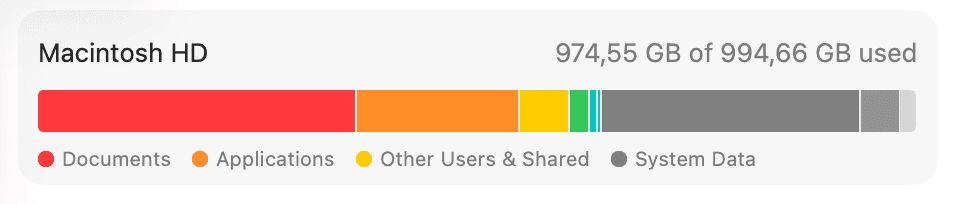
Apple won’t say what the grey part is.
Deleting photos doesn’t touch it. Emptying the Trash doesn’t touch it. Restarting doesn’t touch it. It only shrinks when something deletes what’s inside.
It isn’t just your Mac
Posts from people staring at the same grey block. None of them is about this app.
View @KrauseFx's post on X
— @KrauseFx on X
View @nuke7official's post on X
— @nuke7official on X
View @jjongyuwon's post on X
— @jjongyuwon on X
View @Yorgundurr's post on X
— @Yorgundurr on X
View @Cartidise's post on X
— @Cartidise on X
I hate macOS because of this! it's my everyday pain since 2011 🫠
— @dmytrovirych September 21, 2026
The maker’s own post
Five clicks. That’s the app.
Open, allow access, free up, pay, done. Nothing to configure, nothing running in the background.
Overview
Your disk, the way System Settings shows it — then one card pointing at the grey block.
- Documents 269 GB
- Applications 118 GB
- Other users 9,4 GB
- Photos 269 GB
- Messages 21,8 GB
- System Data 288 GB
System Data
Every category, one plain sentence each, and a bar that shows what your selection frees before you pay.
Done
One number, before and after. Then you close it.
Everything you need
to get the space back
Built for people who don’t know what a cache is and don’t want to.
Opens the grey block
Every item inside System Data gets a size and one line a non-technical person can understand. No file paths, no jargon.
Tells you what is safe
Green means delete it, nothing breaks. Yellow means it’s yours to decide. There is no red, because MacMemory never shows you anything dangerous.
Finds what nothing uses any more
System Settings shows how much space things take. It can’t tell you whether anything still needs them. MacMemory asks the tool that owns each one: Docker knows which images no container uses, Steam knows when you last played a game, and an old project’s own files say when you last worked on it.
Every row says how it knows, and where there is no evidence there is no row. None of them is ticked for you. Docker removes its own images rather than moving them to the Trash, and the row says so. Volumes, where databases live, are never listed.
Shows the result on Apple’s own bar
The same storage bar you see in System Settings, before and after. You watch the grey block shrink and the free space come back.
What’s inside System Data
The things macOS lumps into one grey block, and MacMemory pulls apart.
App caches
Temporary files apps keep to open faster. They rebuild themselves.
Logs and crash reports
Text files apps write for their developers. You will never open them.
Old installers
Installers for apps you already have, old macOS installers, and disk images older than 30 days.
App leftovers
Settings and support files apps left behind when you trashed them.
The full answer, with the steps to free each of these up by hand: What is System Data on a Mac?
One price.
Lifetime access.
One-time payment. No subscription. Buy once at the early price and download it straight away.
$19$29
- One-time payment
- 14-day money-back guarantee
- Lifetime updates included
- Native macOS app, works offline
- 1 Mac license
1 Mac, $19, one-time payment.
$29$44
- One-time payment
- 14-day money-back guarantee
- Lifetime updates included
- Native macOS app, works offline
- 2 Macs license
2 Macs, $29, one-time payment.
$39$59
- One-time payment
- 14-day money-back guarantee
- Lifetime updates included
- Native macOS app, works offline
- 3 Macs license
3 Macs, $39, one-time payment.
Frequently Asked
Questions
Is it safe?
Is MacMemory a subscription?
Does it run in the background?
Is "memory" the same as storage?
Which Macs does it work on?
How do I get the app after buying?
Is there a money-back guarantee?
Goal Rings app for macOS
 Goal Rings app for macOS
Your goals, at the edge of your screen.
Rings that fill as you work, living in the menu bar so your goals stay in sight without another app to open.
Learn more
Localdock app for macOS
 Localdock app for macOS
Named addresses for your local dev servers.
Give every local project a real name instead of a port number, and stop guessing which one is running on 3000.
Learn more